Depth Camera Routine
1、G1 robot depth camera introduction and official information acquisition
Section titled “1、G1 robot depth camera introduction and official information acquisition”The G1 robot depth camera is located overhead and is a realsense D435i.
The camera includes binocular infrared camera (global shutter), laser transmitter, RGB camera (rolling shutter), and 6-axis imu.
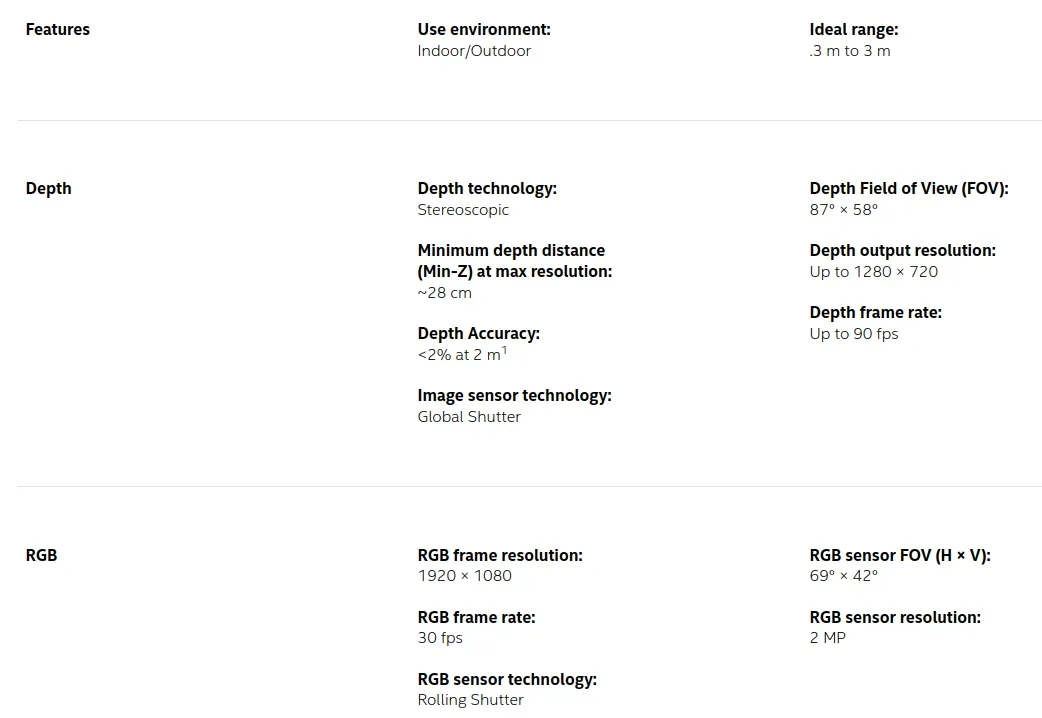
- Product page: https://www.intelrealsense.com/depth-camera-d435/realsense
- Detailed documentation: https://dev.intelrealsense.com/docs/docs-get-started
- Github official address: https://github.com/IntelRealSense
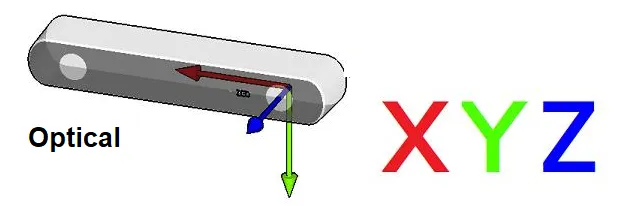
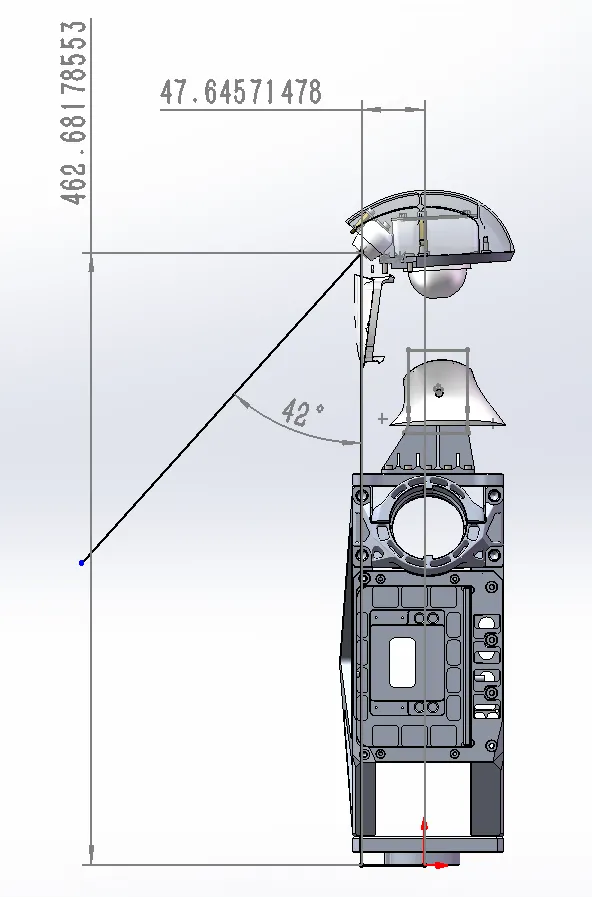
The depth camera coordinate system, the relationship between the depth camera coordinate system and the robot center coordinate system:
2. Data acquisition
Section titled “2. Data acquisition”2.1 View the data through the host computer
Section titled “2.1 View the data through the host computer”On windows,the download Intel RealSense. Viewer.Exe links: https://github.com/IntelRealSense/librealsense/releases On Linux, need to compile the SDK installation.
- Ubuntu 18/20/22 LTS installation reference: https://github.com/IntelRealSense/librealsense/blob/master/doc/installation.md
- NVIDIA Jetson system installation reference: https://github.com/IntelRealSense/librealsense/blob/master/doc/installation_jetson.md
- Raspberry Pi system installation reference: https://github.com/IntelRealSense/librealsense/blob/master/doc/RaspberryPi3.md
Before use, you need to install librealsense on the robot’s NX computer platform.
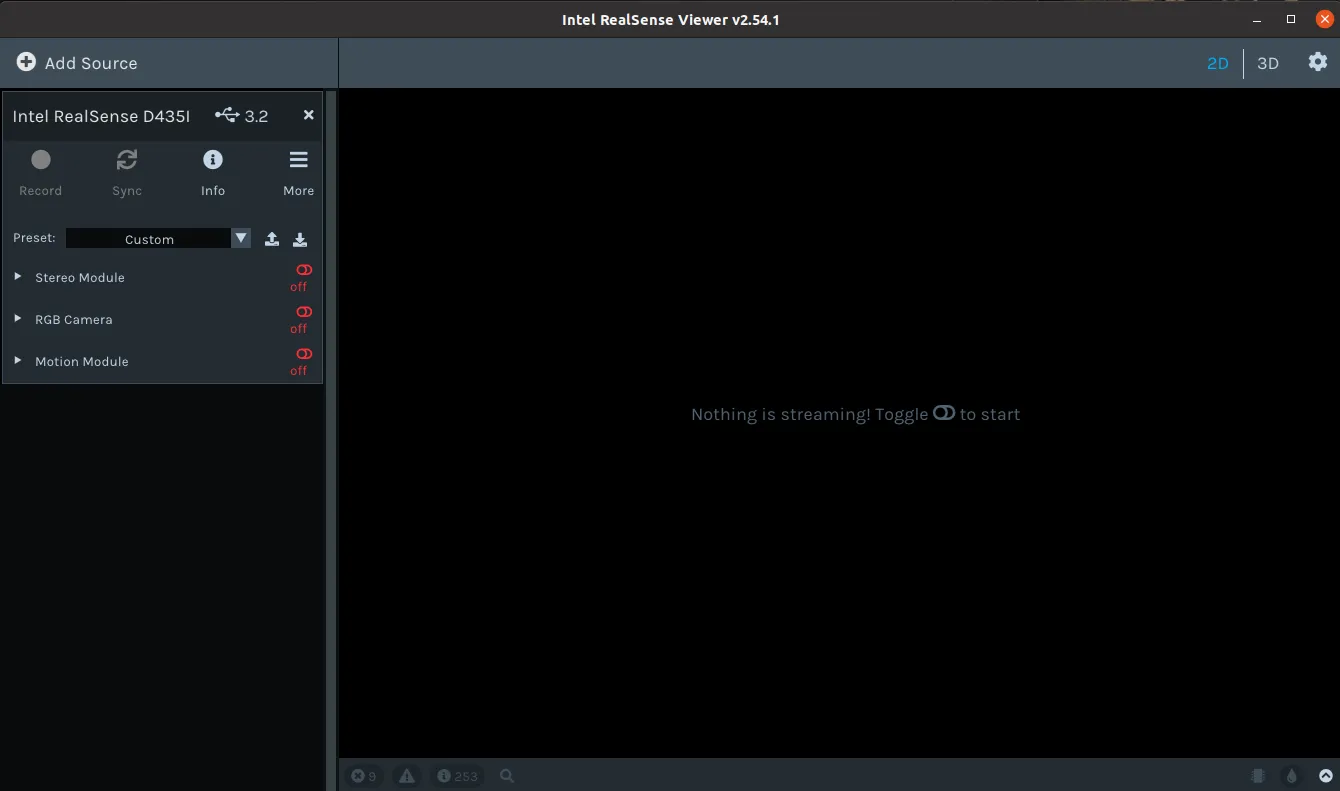
When the hardware connection is normal, enter realsense-viewer on the terminal to open the software. You can view:
2.2 Get data via ros
Section titled “2.2 Get data via ros”Ros camera driver code warehouse: https://github.com/IntelRealSense/realsense-ros Refer to the readme file of the code repository for detailed instructions. In daily use, it is recommended to obtain data through the sdk and process it.
2.3 Obtain data through the SDK
Section titled “2.3 Obtain data through the SDK”Camera SDK code warehouse: https://github.com/IntelRealSense/librealsense
The use of SDK can be referred to: Code content in /librealsense-2.54.1/examples
Reference demo:
/** * @file test.cpp * get_camera_imu_stream_test * */#include <librealsense2/rs.hpp>#include <librealsense2/hpp/rs_internal.hpp>#include <unistd.h>#include <iostream>
#include <mutex>#include <thread>
#include <opencv2/core.hpp>#include <opencv2/imgproc.hpp>#include <opencv2/imgcodecs.hpp>#include <opencv2/highgui.hpp>
std::mutex mutex;rs2::frameset fs_frame = {};double fs_timestamp = 0.0;bool fs_flag = false;
void stream_callback(const rs2::frame& frame){    static double fs_last_timestamp = 0.0;    static double gyro_last_timestamp = 0.0;    static double accel_last_timestamp = 0.0;
    if(rs2::frameset c_frame = frame.as<rs2::frameset>()){        // do not use        // // double f_timestamp = c_frame.get_timestamp()*1e-3;        // // printf("frame f_timestamp:   %.4f \n", f_timestamp);
        double clc_timestamp;{            struct timespec time = {0};            clock_gettime(CLOCK_REALTIME, &time);            clc_timestamp = time.tv_sec + time.tv_nsec*1e-9;        }
        std::unique_lock<std::mutex> lock(mutex);        fs_frame = c_frame;        fs_timestamp = clc_timestamp;        fs_flag = true;        lock.unlock();
        // printf("frame clc_timestamp:  %.4f \n", clc_timestamp);        // printf("frame fps:  %.4f \n", 1/(clc_timestamp - fs_last_timestamp));
        fs_last_timestamp = clc_timestamp;    }else if(rs2::motion_frame m_frame = frame.as<rs2::motion_frame>()){
        if (m_frame.get_profile().stream_name() == "Gyro"){            double clc_timestamp;{                struct timespec time = {0};                clock_gettime(CLOCK_REALTIME, &time);                clc_timestamp = time.tv_sec + time.tv_nsec*1e-9;            }
            // Get gyro measures            rs2_vector gyro_data = m_frame.get_motion_data();
            // std::cout << "gyro_data" << gyro_data << std::endl;
            // printf("gyro clc_timestamp:  %.4f \n", clc_timestamp);            // printf("gyro fps:  %.4f \n", 1/(clc_timestamp - gyro_last_timestamp));
            gyro_last_timestamp = clc_timestamp;        }else if (m_frame.get_profile().stream_name() == "Accel"){            double clc_timestamp;{                struct timespec time = {0};                clock_gettime(CLOCK_REALTIME, &time);                clc_timestamp = time.tv_sec + time.tv_nsec*1e-9;            }
            // Get accelerometer measures            rs2_vector accel_data = m_frame.as<rs2::motion_frame>().get_motion_data();            // std::cout << "accel_data" << accel_data << std::endl;
            // printf("accel clc_timestamp:  %.4f \n", clc_timestamp);            // printf("accel fps:  %.4f \n", 1/(clc_timestamp - accel_last_timestamp));
            accel_last_timestamp = clc_timestamp;        }    }}
rs2::device get_a_realsense_device(){    // Instantiate context    rs2::context ctx;
    // The query_device method of the context retrieves a list of devices and returns a Device_List object    rs2::device_list devices = ctx.query_devices();
    // Instantiate device    rs2::device selected_device;    if (devices.size() == 0){        std::cerr << "No device connected!!!!!" << std::endl;        exit(0);    }
    // Printing device information    std::cout <<"get device num: "<<devices.size()<<std::endl;    for (int i = 0; i < devices.size(); i++){        std::vector<rs2::sensor> sensors = devices[i].query_sensors();        std::string serial = devices[i].get_info(RS2_CAMERA_INFO_SERIAL_NUMBER);        std::string port = devices[i].get_info(RS2_CAMERA_INFO_PHYSICAL_PORT);
        std::cout << "get serial " << i << " : " << serial << std::endl;        std::cout << "get port " << i << " : " << port << std::endl;    }
    // Passing the first device to the selected_device obtained by device instantiation    selected_device = devices[0];
    // At this point, selected_device represents our current device and returns it    return selected_device;}
void  get_sensor_option(const rs2::sensor& sensor){    std::cout << "Sensor name: " << "<"  << sensor.get_info(RS2_CAMERA_INFO_NAME) << ">" <<std::endl;    std::cout << "This sensor supports the following options:\n" << std::endl;    // Cycle all parameters    for (int i = 0; i < static_cast<int>(RS2_OPTION_COUNT); i++)    {        rs2_option option_type = static_cast<rs2_option>(i);
        // Firstly, determine whether the sensor supports this option setting        if (sensor.supports(option_type))        {            // Retrieve and print a description of the current option            const char* description = sensor.get_option_description(option_type);
            // Retrieve the value of the current option            float current_value = sensor.get_option(option_type);
            // Get the value range, default value, and value step size of the option            rs2::option_range range = sensor.get_option_range(option_type);            float default_value = range.def;            float maximum_supported_value = range.max;            float minimum_supported_value = range.min;            float difference_to_next_value = range.step;
            // print            std::cout << "    " << i << ": "  << "<" << option_type  << ">" << std::endl;            std::cout << "        Description   : " << description << std::endl;            std::cout << "        Min Value     : " << minimum_supported_value << std::endl;            std::cout << "        Max Value     : " << maximum_supported_value << std::endl;            std::cout << "        Step          : " << difference_to_next_value << std::endl;            std::cout << "        Default Value : " << default_value << std::endl;            std::cout << "        Current Value : " << current_value << std::endl;            std::cout << std::endl;        }        else        {            //std::cout << "        is not supported by this sensor" << std::endl;        }    }    std::cout << std::endl;    std::cout << std::endl;}
void change_sensor_option(const rs2::sensor& sensor, rs2_option option_type, float requested_value){    // Firstly, determine whether the sensor supports this option setting    if (!sensor.supports(option_type))    {        std::cout << "option is not supported by sensor " << "<"  << sensor.get_info(RS2_CAMERA_INFO_NAME) << ">" << std::endl;        return;    }    else    {        // Use the set_option function to assign new values to options        sensor.set_option(option_type, requested_value);        std::cout << "<"  << sensor.get_info(RS2_CAMERA_INFO_NAME) << "> " << "change " << "<" << option_type  << ">" << " to " << ": " << requested_value << std::endl;    }
}
void l_get_intrinsics(const rs2::stream_profile& stream, float &_fx, float &_fy, float &_cx, float &_cy){
    // A sensor's stream (rs2::stream_profile) is in general a stream of data with no specific type.    // For video streams (streams of images), the sensor that produces the data has a lens and thus has properties such    //  as a focal point, distortion, and principal point.    // To get these intrinsics parameters, we need to take a stream and first check if it is a video stream    if (rs2::video_stream_profile video_stream = stream.as<rs2::video_stream_profile>())    {        try        {            // Using the get_intriniscs method to obtain camera intrinsic parameters            rs2_intrinsics intrinsics = video_stream.get_intrinsics();            // Process some results            auto principal_point = std::make_pair(intrinsics.ppx, intrinsics.ppy);            auto focal_length = std::make_pair(intrinsics.fx, intrinsics.fy);            rs2_distortion model = intrinsics.model;

            /*std::cout << "width*height         : " << intrinsics.width << " * " << intrinsics.height << std::endl;            std::cout << "Principal Point         : " << principal_point.first << ", " << principal_point.second << std::endl;            std::cout << "Focal Length            : " << focal_length.first << ", " << focal_length.second << std::endl;            std::cout << "Distortion Model        : " << model << std::endl;            std::cout << "Distortion Coefficients : [" << intrinsics.coeffs[0] << "," << intrinsics.coeffs[1] << "," <<            intrinsics.coeffs[2] << "," << intrinsics.coeffs[3] << "," << intrinsics.coeffs[4] << "]" << std::endl;*/            std::cout << "\n\n--------------- intrinsics ---------------" << std::endl;            std::cout << "width*height         : " << intrinsics.width << " * " << intrinsics.height << std::endl;            std::cout << "Camera.fx: " << focal_length.first << std::endl;            std::cout << "Camera.fy: " << focal_length.second << std::endl;            std::cout << "Camera.cx: " << principal_point.first << std::endl;            std::cout << "Camera.cy: " << principal_point.second << std::endl;            std::cout << "---------------  ---------------\n\n" << std::endl;
            _fx = focal_length.first;            _fy = focal_length.second;            _cx = principal_point.first;            _cy = principal_point.second;        }        catch (const std::exception &e)        {            std::cout << "Failed to get intrinsics for the given stream. " << e.what() << std::endl;        }    }}
int main(){    rs2::device selected_device;    selected_device = get_a_realsense_device();
    std::vector<rs2::sensor> sensors = selected_device.query_sensors();
    // Print sensor parameters    for (rs2::sensor sensor : sensors){        get_sensor_option(sensor);    }
    // Set sensor parameters    for (rs2::sensor sensor : sensors){        std::string sensor_name = sensor.get_info(RS2_CAMERA_INFO_NAME);        if(sensor_name == "Stereo Module"){ // Depth camera            change_sensor_option(sensor, RS2_OPTION_VISUAL_PRESET, rs2_rs400_visual_preset::RS2_RS400_VISUAL_PRESET_HIGH_ACCURACY);            change_sensor_option(sensor, RS2_OPTION_ENABLE_AUTO_EXPOSURE, 1);            change_sensor_option(sensor, RS2_OPTION_EMITTER_ENABLED, 1);            change_sensor_option(sensor, RS2_OPTION_LASER_POWER, 150);        }else if(sensor_name == "RGB Module"){            change_sensor_option(sensor, RS2_OPTION_ENABLE_AUTO_EXPOSURE, 1);        }else if(sensor_name == "Motion Module"){            // ...        }    }

    // Instantiate pipeline and config    rs2::pipeline pipe;    rs2::config cfg;
    // Depth stream    cfg.enable_stream(RS2_STREAM_DEPTH, 640, 480, RS2_FORMAT_Z16, 60);    // IR_left stream    cfg.enable_stream(RS2_STREAM_INFRARED, 1, 640, 480, RS2_FORMAT_Y8, 60);    // IR_right stream    cfg.enable_stream(RS2_STREAM_INFRARED, 2, 640, 480, RS2_FORMAT_Y8, 60);    // RGB stream    cfg.enable_stream(RS2_STREAM_COLOR, 848, 480, RS2_FORMAT_BGR8, 60);    // IMU GYRO stream    cfg.enable_stream(RS2_STREAM_GYRO , RS2_FORMAT_MOTION_XYZ32F, 400);    // IMU ACCEL stream    cfg.enable_stream(RS2_STREAM_ACCEL, RS2_FORMAT_MOTION_XYZ32F, 200);
    rs2::pipeline_profile pipe_profile = pipe.start(cfg, stream_callback);
    // get Depth(IR_left) intrinsics    float mCamera_fx, mCamera_fy, mCamera_cx, mCamera_cy;    l_get_intrinsics(pipe_profile.get_stream(RS2_STREAM_DEPTH), mCamera_fx, mCamera_fy, mCamera_cx, mCamera_cy);
    // post process    rs2::temporal_filter temp_filter;    temp_filter.set_option(rs2_option::RS2_OPTION_HOLES_FILL, 6);    temp_filter.set_option(rs2_option::RS2_OPTION_FILTER_SMOOTH_ALPHA, 0.4f);    temp_filter.set_option(rs2_option::RS2_OPTION_FILTER_SMOOTH_DELTA, 20);
    double _timestamp_last = 0.0;    while (true){        rs2::frameset _frame = {};        double _timestamp = 0.0;        bool _flag = false;        std::unique_lock<std::mutex> lock(mutex);        _frame = fs_frame;        _timestamp = fs_timestamp;        _flag = fs_flag;        fs_flag = false;        lock.unlock();
        if(_flag){            printf("_frame fps:  %.4f \n", 1/(_timestamp - _timestamp_last));
            // Obtain data for each image            rs2::depth_frame depth_frame = _frame.get_depth_frame();            rs2::video_frame color_frame = _frame.get_color_frame();            rs2::frame irL_frame = _frame.get_infrared_frame(1);            rs2::frame irR_frame = _frame.get_infrared_frame(2);
            rs2::depth_frame depth_frame_filtered = temp_filter.process(depth_frame);
            // Convert image data to OpenCV format            cv::Mat depth_image(cv::Size(640, 480), CV_16U , (void*)depth_frame.get_data(), cv::Mat::AUTO_STEP); // Depth            cv::Mat color_image(cv::Size(848, 480), CV_8UC3, (void*)color_frame.get_data(), cv::Mat::AUTO_STEP); // RGB            cv::Mat irL_image  (cv::Size(640, 480), CV_8UC1, (void*)irL_frame.get_data()  , cv::Mat::AUTO_STEP); // IR_left            cv::Mat irR_image  (cv::Size(640, 480), CV_8UC1, (void*)irR_frame.get_data()  , cv::Mat::AUTO_STEP); // IR_right
            cv::Mat p_depth_image(cv::Size(640, 480), CV_16U , (void*)depth_frame.get_data(), cv::Mat::AUTO_STEP); // post processed Depth
            // show pictures            if (color_image.empty() || depth_image.empty() || irL_image.empty() || irR_image.empty()) {                std::cerr << "One or more images are empty." << std::endl;                continue;            }            cv::imshow("depth", depth_image);            cv::imshow("color", color_image);            cv::imshow("irL", irL_image);            cv::imshow("irR", irR_image);            cv::imshow("p_depth", depth_image);            cv::waitKey(1);
            _timestamp_last = _timestamp;        }else{            usleep(2000);        }
    }    return 0;}
cmake_minimum_required(VERSION 3.1.0)
project(get_camera_imu_stream_test)
set(CMAKE_BUILD_TYPE Release)set(CMAKE_CXX_FLAGS_RELEASE "-O3 -w")set(CMAKE_C_FLAGS_RELEASE "-O3 -w")
# Find librealsense2 installed packagefind_package(realsense2 REQUIRED)find_package(OpenCV REQUIRED)
# Enable C++11set(CMAKE_CXX_STANDARD 11)set(CMAKE_CXX_STANDARD_REQUIRED TRUE)
# Add the application sources to the targetadd_executable(${PROJECT_NAME} test.cpp)
# Link librealsense2 to the targettarget_link_libraries(${PROJECT_NAME} ${realsense2_LIBRARY} ${OpenCV_LIBS})2.4 Regarding the USB 2.0 and USB 3.0 connection issues of realsense depth cameras
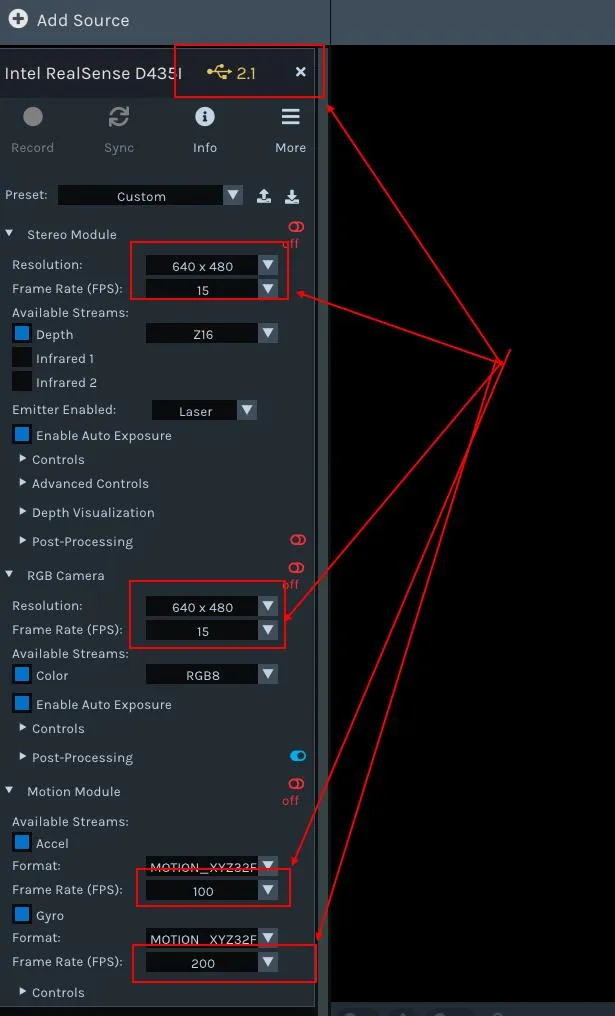
Section titled “2.4 Regarding the USB 2.0 and USB 3.0 connection issues of realsense depth cameras”When the depth camera is connected to usb3.0, the ‘realsense viewer’ software can display its supported resolutions and frame rates:
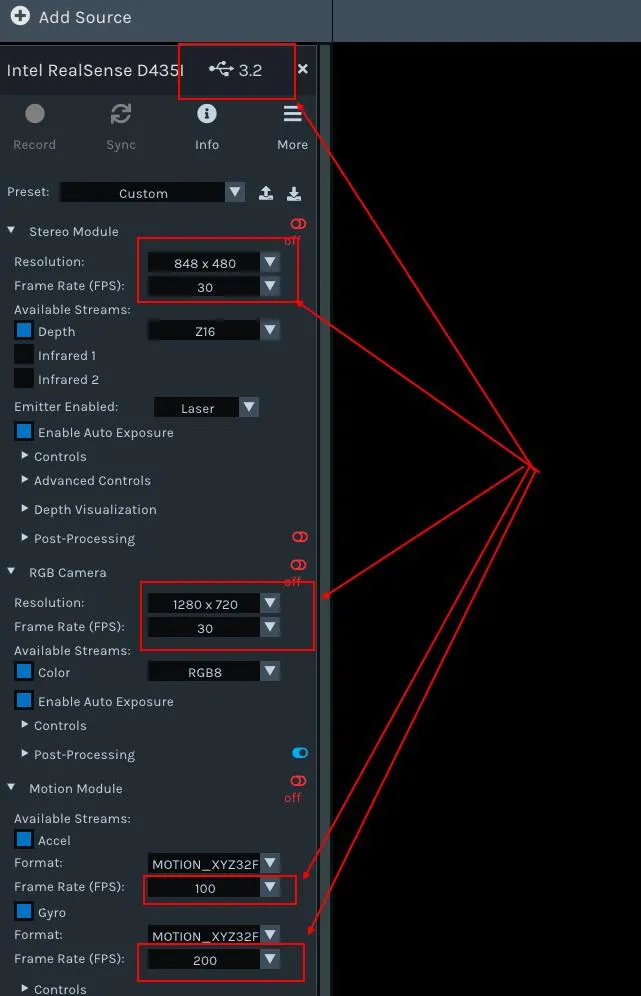 When connecting a depth camera to usb2.0, it is necessary to use a hub adapter to obtain data using the SDK normally. It can also be directly used on the NX processor of G1. Under USB 2.0 connection, the frame rate and resolution that can be obtained may differ from those under USB 3.0 connection. The ‘realsense viewer’ software can display the supported resolutions and frame rates: