Ros2 Communication Routine
Introduction
Section titled “Introduction”unitree_sdk2 implements an easy-to-use robot communication mechanism based on Cyclonedds, which enable developers to achieve robot communication and control (Supports Unitree Go2, B2, H1,and G1).
DDS is alos used in ROS2 as a communication mechanism. Therefore, the underlying layers of Unitree H1, B2, and G1 robots can be compatible with ROS2. ROS2 msg can be direct used for communication and control of Unitree robot without wrapping the SDK interface.
Configuration
Section titled “Configuration”System requirements
Section titled “System requirements”Tested systems and ROS2 distro
| systems | ROS2 distro |
|---|---|
| Ubuntu 20.04 | foxy |
| Ubuntu 22.04 | humble |
Taking ROS2 foxy as an example, if you need another version of ROS2, replace “foxy” with the current ROS2 version name in the corresponding place.
The installation of ROS2 foxy can refer to: https://docs.ros.org/en/foxy/Installation/Ubuntu-Install-Debians.html
ctrl+alt+T open the terminal, clone the repository: https://github.com/unitreerobotics/unitree_ros2
git clone https://github.com/unitreerobotics/unitree_ros2where:
- cyclonedds_ws: The workspace of Unitree ros2 package. The msg for Unitree robot are supplied in the subfolder cyclonedds_ws/unitree/unitree_go and cyclonedds_ ws/unitree/unitree_api.
Install Unitree ROS2 package
Section titled “Install Unitree ROS2 package”1. Dependencies
Section titled “1. Dependencies”sudo apt install ros-foxy-rmw-cyclonedds-cppsudo apt install ros-foxy-rosidl-generator-dds-idlFor the convenience of using the interface, it is recommended to install unitree_sdk2 https://github.com/unitreerobotics/unitree_sdk2
2. Compile cyclone dds
Section titled “2. Compile cyclone dds”The cyclonedds version of Unitree robot is 0.10.2. To communicate with Unitree robots using ROS2, it is necessary to change the dds implementation. See:https://docs.ros.org/en/foxy/Concepts/About-Different-Middleware-Vendors.html
Before compiling cyclonedds, please ensure that ros2 environment has NOT been sourced when starting the terminal. Otherwise, it may cause errors in compilation.
If “source/opt/ros/foxy/setup. bash” has been added to the ~/.bashrc file when installing ROS2, it needs to be commented out:
sudo apt install geditsudo gedit ~/.bashrc# source /opt/ros/foxy/setup.bashCompile cyclone-dds
cd ~/unitree_ros2/cyclonedds_ws/srcgit clone https://github.com/ros2/rmw_cyclonedds -b foxygit clone https://github.com/eclipse-cyclonedds/cyclonedds -b releases/0.10.xcd ..colcon build --packages-select cyclonedds #Compile cyclone-dds package3. Compile unitree_go and unitree_api packages
Section titled “3. Compile unitree_go and unitree_api packages”After compiling cyclone-dds, ROS2 dependencies is required for compilation of the unitree_go and unitree_api packages. Therefore, before compiling, it is necessary to source the environment of ROS2.
source /opt/ros/foxy/setup.bash # source ROS2 environmentcolcon build # Compile all packages in the workspaceConnect to Unitree robot
Section titled “Connect to Unitree robot”1. Network configuration
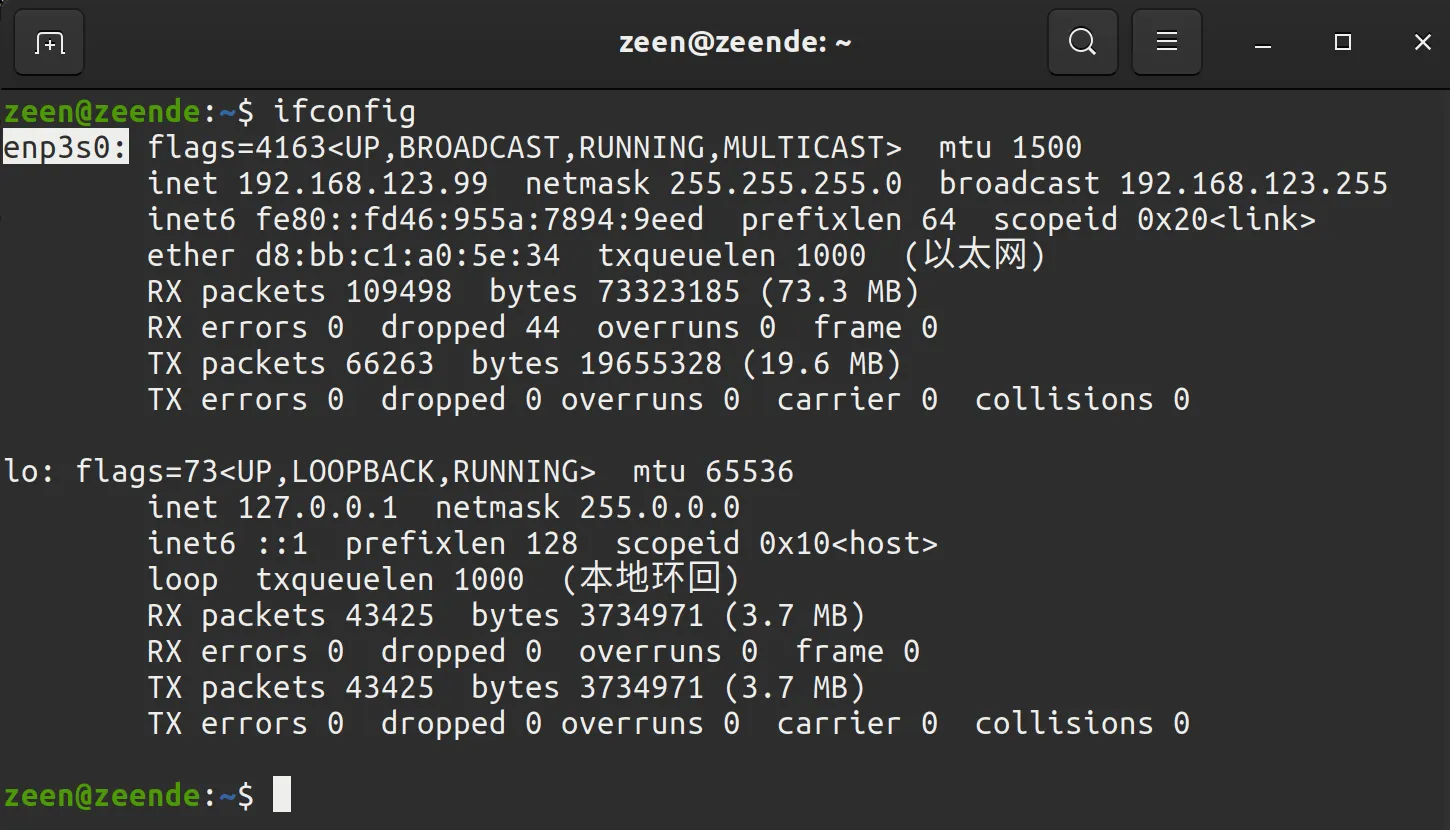
Section titled “1. Network configuration”Connect Unitree robot and the computer using Ethernet cable. Then, use ifconfig to view the network interface that the robot connected. For example, “enp3s0” in the following figure.
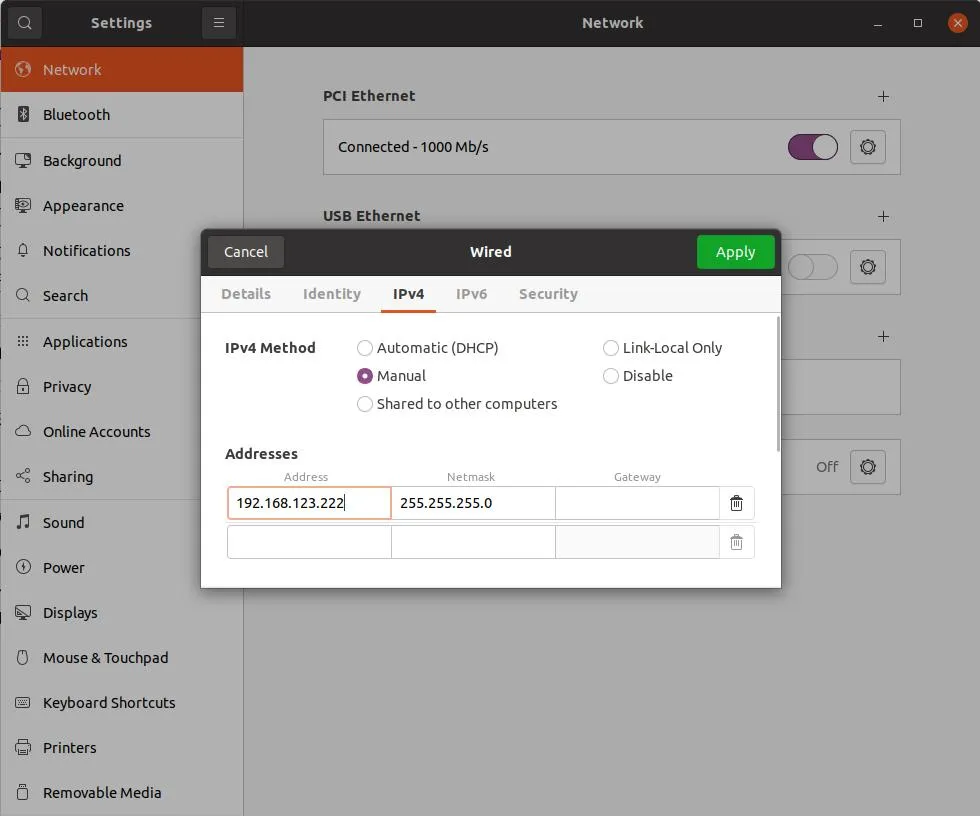
Next, open the network settings, find the network interface that the robot connected.In IPv4 setting, change the IPv4 mode to manual, set the address to 192.168.123.99, and set the mask to 255.255.255.0. After completion, click apply and wait for the network to reconnect.
Open setup.sh file.
sudo gedit ~/unitree_ros2/setup.sh#!/bin/bashecho "Setup unitree ros2 environment"source /opt/ros/foxy/setup.bashsource $HOME/unitree_ros2/cyclonedds_ws/install/setup.bashexport RMW_IMPLEMENTATION=rmw_cyclonedds_cppexport CYCLONEDDS_URI='<CycloneDDS><Domain><General><Interfaces> <NetworkInterface name="enp3s0" priority="default" multicast="default" /> </Interfaces></General></Domain></CycloneDDS>'where “enp3s0” is the network interface name of unitree robot connected. Modify it to the corresponding network interface according to the actual situation.
Source the environment to setup the ROS2 support of Unitree robot:
source ~/unitree_ros2/setup.shIf you don’t want to source the bash script every time when a new terminal opens, you can write the content of bash script into ~/.bashrc, but attention should be paid when there are multiple ROS environments coexisting in the system.
2. Connect and test
Section titled “2. Connect and test”After completing the above configuration, it is recommended to restart the computer before conducting the test.
Ensure that the network of robot is connected correctly, open a terminal and input:
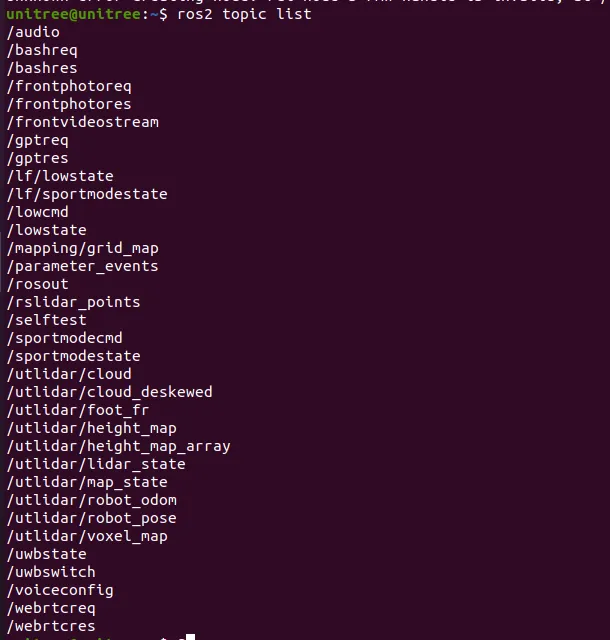
source ~/unitree_ros2/setup.shros2 topic listYou can see the following topics: