unitree_sdk2 It is a layer of encapsulation on DDS that supports QoS configuration of DDS components, provides a simple encapsulation interface for application development, and implements an RPC mechanism based on DDS Topic. It is suitable for data communication in different scenarios through publish/subscribe and request/response methods between internal and external processes in G1.
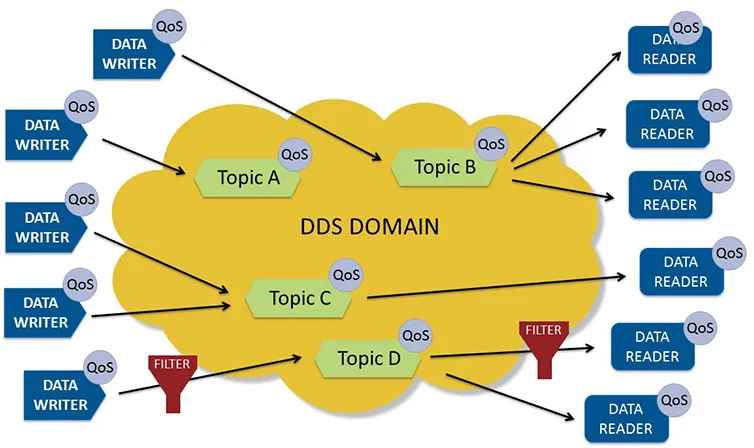
DDS (Data Distribution Service) is a middleware that is a distributed communication specification published by OMG. It adopts a publish/subscribe model and provides various QoS service quality policies to ensure real-time, efficient, and flexible data distribution, meeting the needs of various distributed real-time communication applications.
unitree::robot::ChannelFactory provides a single instance of ChannelFactory under Unitree:: robot to create a DDS Topic based Channel. ChannelFactory must call the initialization interface before use to initialize the underlying DDS configuration. The calling method is as follows
unitree::robot::ChannelFactory::Instance()->Init(0)
The descriptions of each interface are as follows:
Initialize ChannelFactory by specifying three initialization parameters: Domain Id, network card name, and whether to use shared memory.
Parameters
domainId: Default domain id for constructing DdsParticipant; networkInterface: Specify the network card name, default to blank; enableSharedMemory: Whether to use shared memory, default to false.
Return Value
None
Remarks
If the networkInterface is empty, automatic selection of network card configuration will be generated; When developing applications outside of G1, enableSharedMemory needs to be set to false.
Specify name to create a Channel with a specified message type of MSG for receiving data.
Parameters
name:Channel Name; callback: callback function when the message arrives; queuelen: The length of the message cache queue; If the length is 0, do not enable columns in the message cache.
Return Value
template ChannelPtr
Remarks
If the message takes a long time to process in the callback function, it is recommended to enable the message cache queue to avoid blocking the DDS callback thread.
Initialize the Channel and prepare it for receiving or processing messages.
Parameters
callback: callback function when the message arrives; queuelen: The length of the message cache queue; If the length is 0, do not enable columns in the message cache.
Return Value
None
Remarks
If the message takes a long time to process in the callback function, it is recommended to enable the message cache queue to avoid blocking the DDS callback thread.
Function Name
CloseChannel
Function Prototype
void CloseChannel()
Functional Overview
Close Channel。
Parameters
None
Return Value
None
Remarks
Function Name
GetLastDataAvailableTime
Function Prototype
int64_t GetLastDataAvailableTime()
Functional Overview
Gets the last time a message was received.
Parameters
None
Return Value
Returns -1 when the Channel is not initialized; Otherwise, it returns a timestamp that monotonically increments from 0 starting from system startup, accurate to microseconds.
Multiple service components inside the robot provide some functional interfaces externally through RPC Client, and users can easily control the robot through the interface of the Client.